7 Best Free AI Image Generator No Watermark 2026 (Tested & Ranked)

Quick Answer Box
The best free AI image generator no watermark 2026 options are Microsoft Designer (15 daily fast boosts, DALL-E 3 quality), Leonardo.ai (150 daily tokens, multiple AI models), Adobe Firefly (25 monthly credits, commercially safe), and Ideogram (up to 25 images per day, best for text inside images). All four produce clean, watermark-free downloads on their free plans without a credit card.
Thank you for reading this post, don't forget to subscribe!Finding a free AI image generator with no watermark in 2026 is harder than it sounds.
Most tools that call themselves free have a catch. A logo stamped in the corner. A 3-image daily cap with no warning. A credit card screen that appears right before you can download. Or a clean free tier that quietly restricts commercial use in fine print nobody reads.
This guide covers 7 tools that actually deliver: clean downloads, honest free tier limits, and no credit card to start. If you want a wider view of what AI can do without paying, our complete guide to the 100 best free AI tools in 2026 covers image tools alongside 90+ other AI categories including writing, video, and coding.
Here, the focus is just images.
Table of Contents
What Makes a Good Free AI Image Generator No Watermark in 2026?
Not every free tool is actually free. Before committing to one, four things matter:
No visible watermark on downloads. Some tools embed invisible C2PA metadata, a technical standard that records AI origin without affecting how the image looks. Others put an actual logo in the corner. The tools in this list produce visually clean downloads. One important note: sources conflict on Microsoft Designer’s current watermark behavior, so this is flagged for verification below.
Real limits, not fake ones. “Unlimited” often means unlimited at low resolution, or unlimited if you wait 3 minutes per image. Every tool below has its actual daily or monthly limit stated plainly.
No credit card to start. Every tool here lets you generate before asking for payment details. If a tool requires a card before the first image, it is not on this list.
Honest commercial terms. This is where most free AI image guides go wrong. A clean download does not equal commercial rights. The commercial status of each tool is stated explicitly. Do not skip that part.
7 Best Free AI Image Generator No Watermark 2026: Tested and Ranked
These 7 tools were selected based on output quality, actual free tier limits, watermark behavior, and how easy they are to start using today. Here is what each one genuinely gives you.
1. Microsoft Designer (Bing Image Creator)
Best for: Daily general use, complete beginners, fastest setup
Microsoft Designer, accessible at bing.com/images/create, runs DALL-E 3 as its base model alongside Microsoft’s own MAI-Image-1. For a zero-cost tool, the output quality is genuinely good.
Free tier: 15 Boost generations per day. After Boosts run out, generation continues at 1 to 3 minutes per image rather than 10 to 20 seconds. No hard daily ceiling beyond that speed gap.
Watermark: Downloaded images are clean. Microsoft embeds invisible C2PA metadata to indicate AI origin, but nothing appears visually on the image.
Commercial use: Not permitted on the free plan. Microsoft’s terms restrict free outputs to personal use.
Verdict: As a free AI image generator no watermark 2026 option for personal daily use, Microsoft Designer is the simplest and fastest starting point. The output quality matches what you get from ChatGPT Plus on DALL-E 3. The personal-use-only restriction is the main limit worth knowing before you build a workflow around it.
2. Leonardo.ai
Best for: Artistic and stylized output, model variety, concept art, character design
Leonardo.ai gives free users 150 daily tokens. Standard generations cost 4 to 10 tokens each depending on resolution and settings. That works out to roughly 15 to 35 images per day at standard quality.
The real advantage here is model variety. Most free tools lock you into one model. Leonardo lets you switch between Flux-based options for sharp photorealistic detail, DreamShaper variants for painterly illustration, and several models trained specifically for anime, fantasy, and product photography. No other tool on this list comes close on range.
Free tier: 150 daily tokens (~15 to 35 images at standard resolution). Tokens reset every 24 hours.
Watermark: No visible watermark on downloaded images.
Commercial use: Leonardo permits commercial use on many of its models, but conditions vary by model. Review the specific model’s terms before using outputs in paid work.
Verdict: Leonardo.ai is the strongest free AI image generator no watermark 2026 choice for creative variety. One account, multiple AI models, a workable daily allowance, and no logo on your download. The interface is more complex than Bing or Firefly, but the depth rewards time spent learning it.
3. Adobe Firefly
Best for: Commercial use, marketing materials, anyone needing legal clarity on image licensing
Adobe Firefly has one advantage that every other free AI image generator no watermark 2026 option lacks: it is the only major tool trained exclusively on Adobe Stock content and public domain images. That means free-tier outputs come with explicit commercial use rights.
This is not a small thing. The licensing question is what separates a tool you can actually use in client work from one you are hoping will not get you in trouble later.
Free tier: 25 generative credits per month. Not daily monthly. Each credit produces one image. 25 credits per month is enough for focused creative work, not high-volume output.
Watermark: No visible watermark on downloaded images.
Commercial use: Yes, explicitly permitted on the free plan. This is the key differentiator from every other tool in this list.
Verdict: The monthly credit limit is restrictive compared to daily-resetting tools. But for commercial use, no other free AI image generator no watermark 2026 option gives you Firefly’s legal clarity on a free plan. If the image is going into a client project or something you sell, Firefly is where you start.
4. Ideogram
Best for: Text inside images, YouTube thumbnails, posters, social media graphics with readable words
Ideogram solves a problem most AI image tools still handle badly: readable text inside the generated image. Type a headline into most generators and you get garbled letters. Ideogram produces clean, legible typography that competitors cannot match.
This matters more than it sounds. Thumbnails, quote graphics, poster-style social content if the text needs to be readable, Ideogram is genuinely in a different category from everything else on this list.
Free tier: Approximately 25 images per day. Each prompt generates multiple variations. Generation speed on the free tier is slower than paid plans (30 to 90 seconds per batch).
Watermark: No visible watermark on downloaded images. However, all free-tier images go into Ideogram’s public gallery by default. If you are working on a client brief or anything private, your prompts and outputs are visible to other users.
Commercial use: Personal use only on the free plan.
Verdict: Ideogram is the right free AI image generator no watermark 2026 pick for thumbnails, quote graphics, poster designs, or any image where the text needs to be readable. The public gallery default is a real privacy consideration it is not a buried setting, it is the default behavior on the free plan.
5. Google ImageFX
Best for: Photorealistic images, editorial visuals, Google ecosystem users
Google ImageFX runs on Google’s Imagen model and produces consistently photorealistic results. The interface is minimal: type a prompt, get images. It is one of the simpler tools on this list from a user experience perspective.
Free tier: Approximately 20 to 30 images per day. Each prompt generates 4 images; most users get 5 to 7 prompts before hitting the daily cap. The limit resets 24 hours from your first generation of the day, not at a fixed midnight time.
Watermark: Google embeds an invisible SynthID marker in all ImageFX images. No visible watermark on downloads.
Commercial use: Review Google’s current terms at labs.google/fx/policies before commercial use. Less explicit than Adobe Firefly.
Verdict: Google ImageFX is a solid free AI image generator no watermark 2026 option when photorealism and scene coherence are the priority. The SynthID marker is invisible and does not affect how the image looks. For Google account users, setup takes seconds.
6. Perchance
Best for: Zero-friction access, no-account generation, unlimited quick testing
Perchance asks for nothing. No email, no login, no credit card. Open the browser and generate. Quality is lower than Leonardo or Firefly, but when access is completely frictionless and limits are removed, it fills a real gap.
Free tier: Unlimited generations with no account required.
Watermark: No visible watermark on outputs.
Commercial use: Terms on Perchance are less formally documented than corporate tools. Do not use outputs commercially without reading the specific generator’s current terms directly.
Verdict: As a free AI image generator no watermark 2026 for rapid idea testing and brainstorming without any setup, Perchance is hard to argue against. For polished output or anything professional, the other tools on this list are the right choice.
7. Craiyon (formerly DALL-E Mini)
Best for: Unlimited concept visualization, rough direction testing, no-login bulk ideas
Craiyon offers unlimited free generation with no login required. Output quality is the lowest on this list. Colors can be flat, anatomy inconsistent, fine detail frequently lost. For rough proof-of-concept testing or getting a quick visual direction, it does the job.
Free tier: Unlimited. No account required. Ads are displayed but there is no paywall.
Watermark: Watermark-free on the standard output.
Commercial use: Check Craiyon’s current terms before any commercial use. Training data provenance means commercial licensing clarity is lower than Firefly.
Verdict: Craiyon is useful for one thing: unlimited concept testing at zero cost and zero setup. It is not the right tool for finished work or client deliverables.
Quick Comparison: Free AI Image Generators No Watermark in 2026
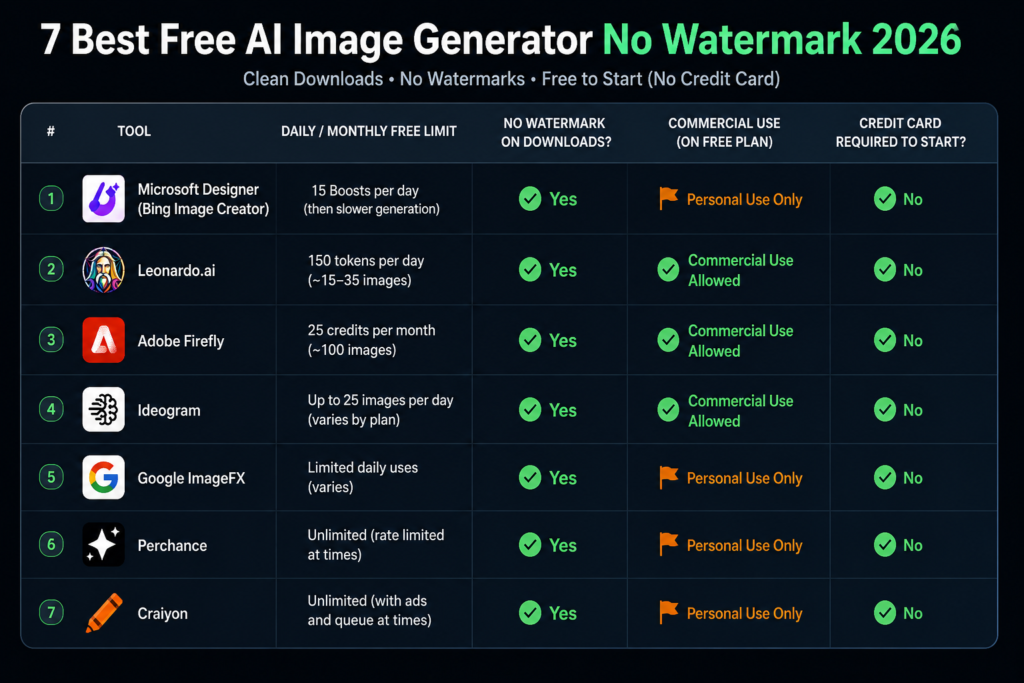
The following table summarizes which free AI image generator no watermark 2026 tool fits which use case:
| Tool | Free Images Available | No Watermark | Commercial Use (Free) | Account Required |
| Microsoft Designer | 15 fast + unlimited slow/day | Yes* | No personal only | Yes (free Microsoft account) |
| Leonardo.ai | ~15–35/day (150 tokens) | Yes | Check per-model terms | Yes |
| Adobe Firefly | 25/month | Yes | Yes explicit | Yes (free Adobe account) |
| Ideogram | ~25/day | Yes (public gallery) | No personal only | Yes |
| Google ImageFX | ~20–30/day | Yes (SynthID, invisible) | Check Google terms | Yes (Google account) |
| Perchance | Unlimited | Yes* | Inconsistent | No |
| Craiyon | Unlimited | Yes* | Check current terms | No |
Which Free AI Image Generator No Watermark Allows Commercial Use in 2026?
This is the question that separates genuinely useful free AI image generator no watermark 2026 guides from the ones that just list tools and leave you guessing. The short answer: only Adobe Firefly explicitly permits commercial use on the free tier.
Here is the full breakdown:
Adobe Firefly trains exclusively on licensed Adobe Stock and public domain content. That legal foundation is exactly why it can offer commercial rights that others cannot. The 25-credit monthly limit is the trade-off for that clarity.
Leonardo.ai has a more permissive approach, but conditions vary by model. Their documentation generally allows commercial use across many models, but you need to verify the specific model used before committing to client work.
Microsoft Designer and Ideogram both restrict free outputs to personal use in their current terms of service.
Google ImageFX has less explicit commercial guidance. Review Google’s policy at labs.google/fx/policies directly before any commercial use.
Perchance and Craiyon have informal or inconsistent documentation. Do not use their outputs commercially without reading their current terms.
The practical answer: if the image is going into a client project, paid advertising, or anything that generates revenue, start with Firefly for the 25 monthly credits where legal clarity actually matters. Pair it with a paid plan elsewhere for higher-volume commercial work.
For a broader look at how different AI platforms handle content ownership and licensing, our ChatGPT vs Claude vs Gemini comparison covers how the major AI providers approach these questions differently.
How to Get Better Results From Any Free AI Image Generator No Watermark in 2026
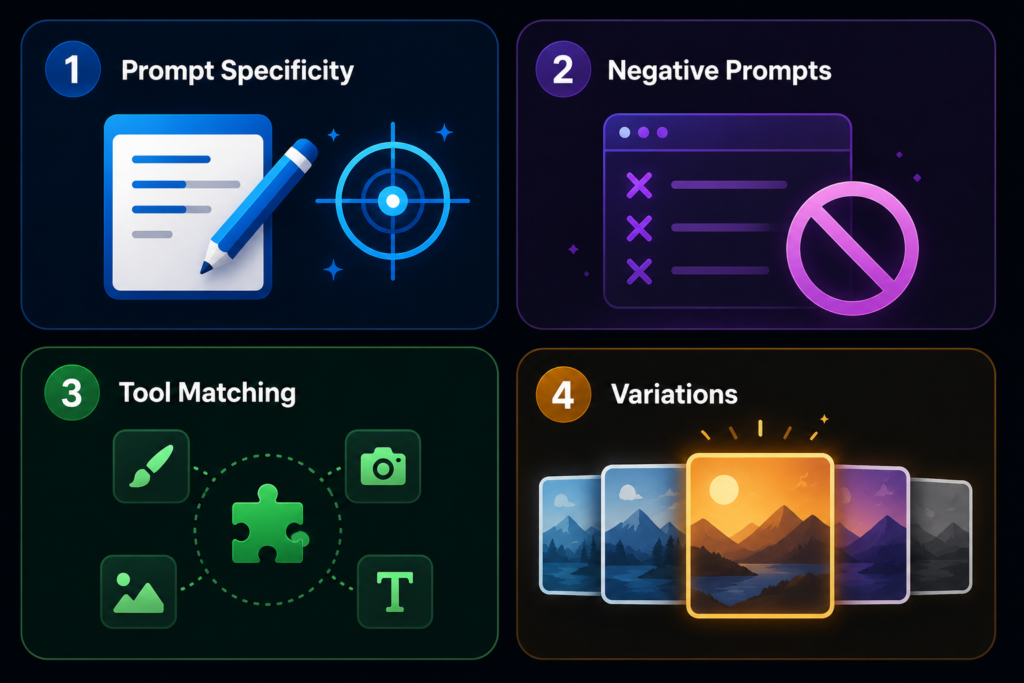
Output quality on any free AI image tool depends more on how you write the prompt than on which tool you pick. These four practices consistently produce better results across all the tools in this list.
Be Specific About Style, Not Just Subject
“A person standing outside” produces average results. “A woman in her 30s on a rainy Tokyo street at night, neon reflections on wet pavement, cinematic photography style, 50mm lens, shallow depth of field” produces something usable. The model cannot guess what you mean by vague descriptions. Give it enough to work with.
Add Negative Prompts
Most tools accept instructions about what you do not want. Writing “no watermark, no text, no blurry background, no artifacts” directly into your prompt changes the output. For tools with a dedicated negative prompt field, use it. The difference in output quality is noticeable.
Match the Tool to the Task
Use the right free AI image generator no watermark for the right job. Ideogram for anything with readable text. Firefly for commercially safe output. Leonardo for stylized or character work. Microsoft Designer for fast daily personal use. Forcing one tool to handle every use case produces worse results than switching.
Generate Variations Before Deciding
Ideogram and Leonardo both produce multiple variations from a single prompt. Generate at least four options before deciding an idea will not work. The first result is rarely the strongest one. Most experienced users pick from variation sets, not first outputs.
Common Mistakes That Waste Your Free Credits
Assuming No Watermark Means Commercial Use Is Allowed
“Free AI image generator no watermark 2026” and “commercially usable free AI image” are two different things. A clean download with no visible logo does not grant commercial rights. Always check the specific platform’s current terms before putting any free-tier output into client work, paid advertising, or products you sell. This mistake is common and avoidable.
Not Knowing When the Daily Limit Resets
Most free tiers reset based on your first generation of the day, not at a fixed midnight. Google ImageFX resets 24 hours from your first prompt of the day. Bing Creator boosts follow a different schedule. Knowing the exact reset logic before you burn through credits at 11pm matters more than most users realize until it is too late.
Using a General Tool for Specialized Work
If you need readable text inside an image, do not waste Microsoft Designer credits on it. The output will disappoint. Go to Ideogram. If you need a commercially safe image, do not assume Leonardo’s terms cover your use case. Go to Firefly. Mismatching tool to task wastes daily credits on outputs that will not actually work.
Ignoring Ideogram’s Public Gallery Default
All free-tier Ideogram generations go into a public gallery by default. If you are generating images for a client brief or anything confidential, your prompts and results are visible to anyone on the platform. This is not a buried privacy setting. It is the default behavior on the free plan and it does not change unless you pay.
People Also Ask
Is there a genuinely free AI image generator with no watermark in 2026?
Yes. Several tools offer this, including Microsoft Designer, Leonardo.ai, Adobe Firefly, Ideogram, and Google ImageFX. The best free AI image generator no watermark 2026 option depends on your use case: how many images you need per day, whether commercial rights matter, and what output style fits your work. None of these tools require a credit card to start.
Which free AI image generator needs no account and no login?
Perchance and Craiyon both work without any account or email address. Perchance offers unlimited generation at lower quality. Craiyon also offers unlimited access at similar quality levels. Neither is the right tool for professional or client work, but both produce results in seconds with zero setup.
Can I use free AI image generator outputs in commercial projects?
Adobe Firefly is the only tool in this list that explicitly permits commercial use on the free plan. Microsoft Designer, Ideogram, and Google ImageFX restrict free outputs to personal use. Leonardo.ai allows commercial use on many of its models, but the exact conditions depend on which model generated the image. Always verify the current terms of the specific tool before any commercial use.
What free AI image generator is best for YouTube thumbnails with text?
Ideogram is the strongest option. It renders readable text inside generated images more reliably than any other free tool available. Most generators, including Microsoft Designer and Leonardo.ai, still struggle with consistent typography. If your thumbnail needs a readable headline baked into the image, Ideogram is the right tool.
How many images can you generate free per day without a watermark?
It varies by tool. Microsoft Designer: 15 fast per day, then unlimited at slower speed. Leonardo.ai: 15 to 35 per day using 150 daily tokens. Ideogram: approximately 25 per day. Google ImageFX: approximately 20 to 30 per day. Adobe Firefly: 25 per month, not per day. Perchance and Craiyon: unlimited with no daily cap.
Frequently Asked Questions
Q1: What is the difference between a visible watermark and invisible C2PA metadata?
A visible watermark is a logo or text overlay you can see on the image itself. C2PA metadata is an invisible digital tag embedded in the file that records the image was AI-generated. Microsoft Designer and Google ImageFX both embed this invisible tag, but the downloaded image looks completely clean. For most use cases, this distinction does not matter. For digital journalism or content verification contexts, it might.
Q2: Does Midjourney have a free tier in 2026?
No. Midjourney removed its free trial in 2023 and has not brought it back. Their current entry plan starts at $10 per month. Any guide listing Midjourney as a free option is using outdated information. If you want artistic quality close to Midjourney without paying, Leonardo.ai’s free tier with Flux-based models is the closest equivalent available today.
Q3: Which free AI image generator works best on mobile?
Microsoft Designer has dedicated iOS and Android apps. Canva AI, not reviewed in detail here, gives 50 lifetime free credits with a full design interface and a strong mobile app. Most other tools work through a mobile browser. Ideogram and Leonardo both have mobile-accessible web interfaces that function reasonably well, though both are more comfortable on desktop for detailed prompt work.
Q4: Is Stable Diffusion free and watermark-free?
Yes, in two ways. Running Stable Diffusion locally on your own hardware is completely free, produces no watermarks, and has no daily usage cap. If you do not have suitable hardware, Hugging Face Spaces hosts several Stable Diffusion interfaces at no cost. Generation is slower than cloud-based tools, but there is no ceiling. This is the best option for technically comfortable users who want truly unlimited output.
Q5: Can I generate AI images for YouTube thumbnails for free?
Yes. Ideogram is the best choice for YouTube thumbnails because it handles readable text inside images better than any other free tool. Microsoft Designer works well for thumbnail visuals that do not require in-image text. Both produce watermark-free downloads on their free plans, and both work without a credit card.
Q6: What happens when I run out of daily free credits?
It depends on the tool. Microsoft Designer slows down but continues generating at no cost. Leonardo.ai pauses new generations until tokens reset the following day. Ideogram stops new generations until the daily cap resets. Adobe Firefly stops when monthly credits are exhausted. Perchance and Craiyon have no limits to exhaust.
Key Takeaways
- he best free AI image generator no watermark 2026 options are Microsoft Designer, Leonardo.ai, Adobe Firefly, Ideogram, and Google ImageFX
- Only Adobe Firefly explicitly allows commercial use on the free plan every other tool restricts free outputs to personal use or uses ambiguous licensing
- Microsoft Designer gives 15 fast generations daily, then unlimited at slower speed, with no visible logo on downloads
- Ideogram is the right choice when text needs to be readable inside the image thumbnails, posters, social graphics with headlines
- Leonardo.ai has the most model variety of any free option, with 150 daily tokens across multiple AI models including Flux
- Perchance and Craiyon give unlimited access with no login, but at noticeably lower output quality
- “No watermark” and “commercially usable” are two completely different things always verify the platform’s current terms before putting free outputs into paid work
- For free AI tools beyond image generation, see the full 100 best free AI tools in 2026 guide covering 90+ more categories
Final Verdict
Start with Microsoft Designer. It is the fastest, the simplest, and the daily Boost limit covers most personal creative work without thinking. The output quality is genuinely good for a free tool.
If creative variety matters more than simplicity, Leonardo.ai is the better call. 150 daily tokens across multiple AI models gives range that no other free option comes close to matching.
For anything commercial, Adobe Firefly is the only free AI image generator no watermark 2026 option with explicit commercial use rights on the free plan. 25 monthly credits is a real constraint, but the legal clarity that comes with it is not available anywhere else at zero cost.
For thumbnails and text-in-image work specifically, Ideogram. Nothing else on this list comes close for that use case.
The right tool is the one that matches your actual work, not the one with the best marketing. Pick by what you need the image to do, not by which tool sounds most impressive.
About the Author
Sahil Ansari is the Founder of Playsip India and a digital entrepreneur with hands-on experience in AI tools, e-commerce, content creation, and online business. He researches emerging technologies and practical productivity systems to help creators, freelancers, and entrepreneurs work more efficiently. For this article, Sahil reviewed official platform documentation, third-party benchmark comparisons, and current community reports to verify free tier limits and licensing terms before publication.
Ready to Try Your First Free AI Image Generator?
Open Microsoft Designer at bing.com/images/create with a free Microsoft account and run your first prompt today. If commercial rights matter from the start, Adobe Firefly at firefly.adobe.com is where to begin.
Explore more practical guides at the Insights by Playsip blog for AI tools that are actually free and actually useful.
This article is for education and is not financial, tax or legal advice. Read the full disclaimer. How we create content.
Keep learning: AI Tools
More sourced guides on this topic, written and checked by our team.
Keep reading

How to Use ChatGPT Free: Complete Beginner’s Guide 2026
ChatGPT crossed 1 billion monthly active users in June 2026. The vast majority of them are not paying anything. Learning how to use ChatGPT

ChatGPT vs Claude vs Gemini (2026): Which AI Actually Wins?
In this ChatGPT vs Claude vs Gemini comparison, a blind test with 134 voters and 8 prompts shows clear differences between all three models

100 Best Free AI Tools in 2026 That Can Save You Hours Every Day
The best free AI tools in 2026 include ChatGPT, Claude, Google Gemini, Microsoft Copilot, Perplexity, Grammarly, NotebookLM, Suno AI, GitHub Copilot, and Bing Image