100 Best Free AI Tools in 2026 That Can Save You Hours Every Day

The best free AI tools in 2026 include ChatGPT, Claude, Google Gemini, Microsoft Copilot, Perplexity, Grammarly, NotebookLM, Suno AI, GitHub Copilot, and Bing Image Creator. There are now over 100 legitimately free AI tools across writing, design, video, research, coding, and automation that require no credit card and deliver real daily time savings.
Thank you for reading this post, don't forget to subscribe!Table of Contents
You do not need to spend a single rupee to use powerful AI tools in 2026. That would have sounded absurd three years ago. Today, it is simply true.
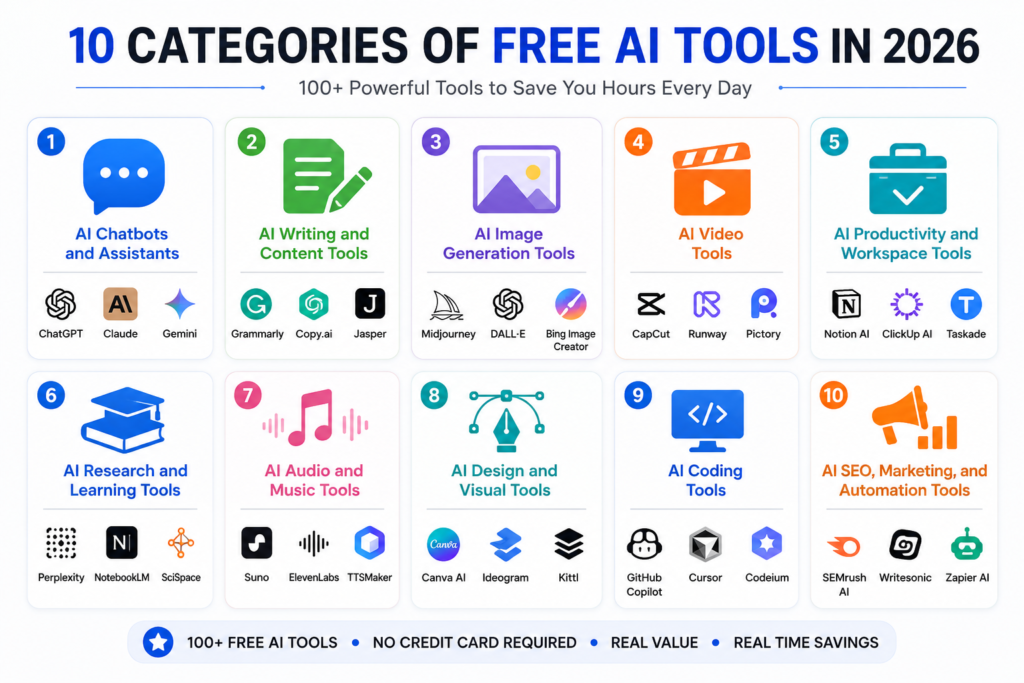
The number of free AI tools in 2026 has grown rapidly, giving users more choice than ever before.
According to Federal Reserve (via TaskROI) data of 2024, AI saves average 5.4% of work hours weekly (~2.2 hrs/40-hr week). Power users who combine multiple tools consistently report saving 9 or more hours per week. The difference between those users and everyone else comes down to one thing: knowing which tools are actually worth your time.
This list covers 100 genuine, tested free AI tools in 2026 that help creators, students, freelancers, and businesses save hours every week. Not free trials. Not “free” plans that quietly ask for a credit card on day 7. Actual tools with real free tiers you can open today and use immediately.
Each tool comes with a short description, what the free plan actually gives you, and who it is best suited for. By the end of this guide, you will have a clear picture of which tools belong in your daily workflow.
Why Free AI Tools Are Worth Your Time in 2026

The free AI tool landscape shifted dramatically between 2023 and 2026. Three years ago, the free tiers were mostly bait, offering just enough to frustrate you into paying. Now they are genuinely useful.
Two things drove that change. First, competition. When ChatGPT, Claude, Gemini, and Copilot all offer capable free tiers, any one of them being significantly worse drives users straight to a competitor. Second, open-source AI matured fast. When companies like DeepSeek release powerful models for free, commercial tools have to respond with better offerings to compete.
According to McKinsey’s 2026 State of AI report, 91% of businesses now use AI in at least one capacity. That scale created real pressure to lower the cost of access. What resulted is the strongest free AI tool environment in history.
That said, free tiers do have limits worth knowing about. Smaller context windows. Daily usage caps. Some features locked behind payment. This list notes those limits where they matter.
Category 1: AI Chatbots and Assistants (Tools 1–10)
The Swiss army knives of AI. Good for writing, research, coding help, summarizing documents, and a hundred other tasks. Most people should start with one strong chatbot and use it daily before adding anything else to their stack.
1. ChatGPT (OpenAI)
The most widely used AI tool in the world. Free tier includes GPT-4o with limited daily messages, then falls back to GPT-4o mini with no limits. Handles writing, coding, research, data analysis, and image understanding.
Free plan gives: Limited daily GPT-4o messages + unlimited GPT-4o mini.
Best for: All-around daily tasks.
2. Claude (Anthropic)
Strong case for being the best AI assistant for writing and nuanced reasoning. The free tier at claude.ai gives real daily access. Better than ChatGPT on many long-form writing tasks, and more reliable for careful thinking.
Free plan gives: Daily message limit.
Best for: Writing, editing, content strategy, long documents.
3. Google Gemini
Gemini 1.5 Flash is free with high daily limits. Integrates directly with Google Docs, Gmail, and Drive if you live in Google’s ecosystem. Strong for research and document-based tasks.
Free plan gives: Generous daily usage.
Best for: Google Workspace users, research.
4. Microsoft Copilot
Completely free. No signup required. You open a browser and start. Runs GPT-4-level intelligence through Bing and includes free image generation.
Free plan gives: Unlimited use, no account needed.
Best for: Zero-friction access, quick tasks, Windows users.
5. Perplexity AI
The only chatbot that shows its sources. Searches the web and cites exactly where every answer came from. A genuinely different tool from a general chatbot, and the free plan is surprisingly generous.
Free plan gives: Several searches daily, source citations on every answer.
Best for: Fact-checking, research, current events.
6. Grok (xAI)
Available free via X (formerly Twitter). Real-time web access, strong analysis. The free tier is more limited than the paid plan, but useful if you already use X and want AI without leaving the app.
Free plan gives: Limited daily queries.
Best for: X users, breaking news analysis.
7. DeepSeek
Open-source and free at chat.deepseek.com. Competes with GPT-4 on coding and reasoning benchmarks. No meaningful usage limits on the basic free model.
Free plan gives: Generous access, no hard limits on basic use.
Best for: Coding, math, analytical tasks, users who want an alternative to OpenAI.
8. Meta AI
Built into WhatsApp, Instagram, Facebook, and Messenger. The most accessible AI for people who live on Meta’s platforms, because there is no separate app or account needed.
Free plan gives: Unlimited use inside Meta apps.
Best for: Casual daily use, WhatsApp users in India.
9. Pi.ai
Designed for conversation, not productivity. More emotionally engaging than most chatbots. Good for thinking through a problem out loud, journaling prompts, or when you want a thoughtful back-and-forth.
Free plan gives: Unlimited conversations.
Best for: Reflective thinking, long exploratory conversations.
10. Poe (Quora)
One app, multiple AI models. Access Claude, ChatGPT, Gemini, and others in the same place. Useful for comparing how different models handle the same task.
Free plan gives: Daily message limits across multiple models.
Best for: Comparing AI models, occasional multi-model use.
Category 2: Best Free AI Tools in 2026 for Writing and Content Creation (Tools 11–22)
These free AI tools in 2026 help writers, bloggers, marketers, and content creators produce better content faster while reducing manual work.
11. Grammarly
Grammar, spelling, punctuation, and basic clarity checking. Works inside Gmail, Google Docs, and most browsers. The free tier handles the majority of everyday writing needs.
Free plan gives: Grammar and spelling checks across all platforms.
Best for: Emails, professional writing, anyone who writes daily.
12. Hemingway Editor
Paste any text and see which sentences are too complex, which words are weak, and what the reading grade level is. Completely free in the browser. Brutal, honest, useful.
Free plan gives: Unlimited use in browser.
Best for: Editing, readability improvement.
13. QuillBot
Paraphrases and summarizes text. Free tier covers 125 words per paraphrase. Useful for rewording content without losing meaning.
Free plan gives: 125-word paraphrase limit.
Best for: Paraphrasing, summarizing short sections.
14. Wordtune
Rewrites sentences in different tones. Free plan gives 10 rewrites per day. Good for when a sentence sounds off but you cannot figure out why.
Free plan gives: 10 rewrites daily.
Best for: Sentence-level editing, tone adjustment.
15. LanguageTool
Grammar and style checking in 30+ languages. Better than Grammarly for non-English writing. Free browser extension available.
Free plan gives: Core grammar and style checking.
Best for: Hindi-English content, multilingual writers.
16. Rytr
Generates short-form content: social posts, email subject lines, product descriptions. Simple, fast, and opinionated in a useful way.
Free plan gives: 10,000 characters per month.
Best for: Social media copy, short marketing content
17. Copy.ai
Marketing copy with a solid template library. Better than a general chatbot for structured persuasive content. Free plan gives: 2,000 words per month + templates. Best for: Marketing copy, ad variations.
18. Writesonic
Blog posts, landing pages, and product descriptions. Output quality has improved significantly since 2023.
Free plan gives: Limited monthly credits.
Best for: First drafts of marketing content.
19. Jenni AI
Built specifically for students and researchers writing long documents. Has AI autocomplete and citation support.
Free plan gives: 200 words per day with AI autocomplete.
Best for: Academic writing, research papers.
20. ProWritingAid
Deep style analysis beyond grammar. Flags passive voice overuse, pacing issues, clichés, and weak word choices. Free browser version available.
Free plan gives: Core style checking in browser.
Best for: Detailed writing improvement, long-form editing.
21. Simplified
Covers writing, design, and social media publishing in one platform.
Free plan gives: Limited AI writing credits and basic design tools.
Best for: Solo creators who want writing and visuals in one place.
22. Hyperwrite
Browser extension that helps you write inside any web application. Free daily AI generations.
Free plan gives: Limited daily generations.
Best for: Writing assistance anywhere on the web.
Category 3: AI Image Generation Tools (Tools 23–31)
The best free AI tools in 2026 for image generation now rival many paid alternatives, making professional-quality visuals accessible to everyone.
23. Bing Image Creator (Microsoft Designer)
DALL-E 3 image generation, completely free with a Microsoft account. 100 credits to start, then unlimited slower-tier generations. Probably the best free image generator by quality-to-cost ratio.
Free plan gives: 100 fast credits, then unlimited slow generations.
Best for: High-quality images, completely free.
24. Adobe Firefly
25 generative credits per month free. Trained on licensed content, which makes it the safest choice for commercial use.
Free plan gives: 25 monthly credits.
Best for: Marketing materials, commercially safe images.
25. Canva Magic Media
Image generation inside Canva, no extra app needed. 50 lifetime free credits.
Free plan gives: 50 generations included in free Canva account.
Best for: Quick visuals for social posts and presentations.
26. Ideogram
Around 10 to 25 free daily prompts. Significantly better than most tools at generating readable text inside images, which is a real problem most image AI tools handle badly.
Free plan gives: ~10–25 daily prompts.
Best for: Thumbnails, graphics with text overlay.
27. Leonardo.ai
150 free tokens daily, producing roughly 25 to 30 images at standard quality. Strong at realistic and cinematic styles.
Free plan gives: 150 daily tokens.
Best for: Detailed artistic image generation.
28. NightCafe
5 free credits daily. Focus on artistic styles and creative variety. Strong community of users sharing prompts.
Free plan gives: 5 daily credits.
Best for: Creative art, style exploration.
29. Craiyon
Unlimited free image generation, no account needed. Quality is lower than Bing or Firefly, but unlimited access makes it useful for rapid testing.
Free plan gives: Unlimited, no login required.
Best for: Quick idea testing.
30. Playground AI
1,000 free images per day on the basic model. Clean, beginner-friendly interface.
Free plan gives: 1,000 images daily.
Best for: High-volume image needs.
31. Stable Diffusion (via Hugging Face)
Open-source and free to run online via Hugging Face Spaces. Slower than paid services but no usage ceiling. Advanced users can run it locally for zero cost.
Free plan gives: Unlimited via Hugging Face or self-hosted.
Best for: Technical users, bulk generation.
Category 4: Free AI Tools in 2026 for Video Creation (Tools 32–39)
Among all free AI tools in 2026, video AI has improved the fastest, allowing creators to generate and edit content with minimal effort.
32. Kling AI
66 free daily credits. Produces cinematic-quality AI video clips with consistent characters and multi-shot sequences. One of the most impressive free video generators available.
Free plan gives: 66 daily credits (~10 short clips).
Best for: Short AI-generated video content.
33. CapCut
Free video editing with built-in AI features: auto-captions, background removal, text-to-speech, and AI motion effects. Available on mobile and desktop.
Free plan gives: Full editing suite with AI features, no watermark on exports.
Best for: Social media video, Reels, Shorts.
34. InVideo AI
Converts text or scripts into videos automatically. Free tier adds a watermark, but the output quality is high enough for channels where watermarks are acceptable.
Free plan gives: Text-to-video with watermark.
Best for: Faceless YouTube channels, explainer videos.
35. Veed.io
Browser-based video editing with AI-powered auto-subtitles, eye contact correction, and background removal.
Free plan gives: Basic editing with AI subtitles.
Best for: Adding subtitles, quick video cleanup.
36. Kapwing
AI captions, background removal, and editing in the browser. Good for creating social video without downloading heavy software.
Free plan gives: AI captions, basic editing tools.
Best for: Social video creation.
37. Runway ML
Some of the most advanced AI video generation features available. Free credits are limited but enough to experiment.
Free plan gives: Limited free credits on account creation.
Best for: Testing high-end video generation features.
38. Loom AI
Video messaging with AI-generated transcripts and automatic summaries of recordings.
Free plan gives: Video messaging with AI transcripts.
Best for: Internal team communication, async updates.
39. Captions.ai
AI-powered captions and video editing on mobile, with eye contact correction.
Free plan gives: Basic captions and editing.
Best for: Mobile video creators, face-to-camera content.
Category 5: Free AI Productivity Tools in 2026 (Tools 40–51)
These free AI tools in 2026 focus on productivity, helping professionals automate repetitive tasks, organize information, and save valuable time.
40. Notion AI
AI embedded inside Notion. Drafts pages, summarizes notes, and generates tables from prompts. Limited free AI responses per month.
Free plan gives: Limited monthly AI responses inside Notion workspace.
Best for: Existing Notion users.
41. ClickUp AI
Task management with AI built in. Generates task descriptions, project plans, and meeting summaries.
Free plan gives: Basic AI features inside free ClickUp plan.
Best for: Project management teams.
42. Taskade
AI agents that run tasks autonomously within projects. Builds mind maps and project plans from a single prompt.
Free plan gives: 5 AI agents per month, unlimited projects.
Best for: Project planning, AI-assisted workflows.
43. Fireflies.ai
Joins your Zoom, Google Meet, or Teams calls and automatically transcribes everything. One of the best tools on this list for anyone in back-to-back meetings.
Free plan gives: Unlimited meeting transcriptions, limited storage.
Best for: Meeting transcription, note capture.
44. Otter.ai
600 free transcription minutes per month. Joins meetings and takes notes. One of the most established and trusted transcription tools.
Free plan gives: 600 minutes monthly.
Best for: Recording meetings, interviews.
45. Gamma
Converts a text prompt into a full presentation in under 2 minutes. 400 free AI credits on signup, which is roughly 40 or more presentations.
Free plan gives: 400 credits on signup (~40+ decks).
Best for: Client presentations, pitch decks, reports.
46. Tome
AI-powered storytelling tool. Free tier available. Different from Gamma in that it emphasizes narrative flow rather than slide structure.
Free plan gives: Limited free workspaces.
Best for: Narrative presentations, portfolio pieces.
47. Magical
Browser extension that expands short text shortcuts into full paragraphs. Completely free. Works everywhere. A massive time-saver for anyone who sends repetitive emails or customer messages.
Free plan gives: Unlimited shortcuts and expansions.
Best for: Email, customer support, repetitive communication.
48. Reclaim.ai
AI scheduling assistant that automatically blocks time for tasks and habits in Google Calendar.
Free plan gives: Basic task and habit scheduling.
Best for: Time blocking, calendar management.
49. Tactiq
Real-time note-taking inside Google Meet and Zoom. Captures what is being said without you lifting a pen.
Free plan gives: Real-time transcription in meetings.
Best for: Meeting notes.
50. Mem.ai
AI-powered note-taking that automatically connects related notes and surfaces relevant information.
Free plan gives: Basic note-taking with AI connections.
Best for: Personal knowledge management.
51. Coda AI
Documents and spreadsheets with AI built in. Good for teams that want AI inside structured collaborative documents.
Free plan gives: Basic docs and tables with limited AI.
Best for: Team documents, structured workflows.
Category 6: AI Research and Learning Tools (Tools 52–60)
These free AI tools in 2026 are especially valuable for researchers, students, and professionals who work with large amounts of information daily.
52. NotebookLM (Google)
Upload PDFs, Google Docs, or web pages and ask questions about your own documents. Zero hallucinations because the AI only uses what you upload. Up to 100 notebooks free. Genuinely excellent.
Free plan gives: 100 notebooks, multiple document formats.
Best for: Research, studying, document Q&A
53. Elicit
AI research assistant built for academic literature. Searches papers, extracts key findings, and compares studies side by side.
Free plan gives: Standard access for literature search.
Best for: Academic research, systematic reviews.
54. Consensus
Searches scientific research and gives direct answers with paper citations. Asks the same question researchers would ask, not what you would type into Google.
Free plan gives: Several searches daily with citations.
Best for: Evidence-based health and science questions.
55. SciSpace (Typeset)
Explains academic papers in plain language. Highlight any confusing section and ask for clarification right there on the page.
Free plan gives: Basic explanation features.
Best for: Reading and understanding research papers.
56. Explainpaper
Upload a paper, highlight the confusing parts, and get plain-English explanations. Free and entirely focused on one useful problem.
Free plan gives: Unlimited in basic version.
Best for: Students working through dense academic content.
57. ChatPDF
Upload any PDF and ask questions about it. Simple, fast, and free for basic use.
Free plan gives: Limited pages and queries per day.
Best for: Quick document Q&A.
58. Humata
Similar to ChatPDF but handles larger documents more reliably. Good for legal documents, technical manuals, and long reports.
Free plan gives: Limited document size and queries.
Best for: Large document analysis.
59. Wolfram Alpha
Computational knowledge engine with AI. Not generative AI, but answers factual, mathematical, and scientific queries with precision that chatbots cannot match.
Free plan gives: Standard queries free.
Best for: Math, science, data lookups.
60. Scholarcy
Breaks down research papers into summarized flashcard format. Useful for reviewing multiple papers quickly without reading each in full.
Free plan gives: Basic summaries.
Best for: Reviewing multiple academic papers at speed.
Category 7: AI Audio and Music Tools (Tools 61–68)
Several free AI tools in 2026 can generate voices, music, and audio content that previously required expensive software.
61. ElevenLabs
The best AI voice generation available. Voices sound genuinely natural, not robotic. Attribution required on free plan.
Free plan gives: 10,000 characters per month.
Best for: Voiceovers, text-to-speech, podcast intros.
62. Murf AI
Text-to-speech with natural-sounding voices and a range of accents. Good for e-learning and presentations.
Free plan gives: 10 minutes per month.
Best for: Presentation voiceovers, e-learning narration.
63. Adobe Podcast Enhance
Takes a rough audio recording and makes it sound studio-quality in one click. Completely free. No download required.
Free plan gives: Unlimited audio enhancement.
Best for: Podcast cleanup, voiceover improvement.
64. Suno AI
Generates full songs from a text prompt. Lyrics, instrumentation, and vocals all included. The quality for a free tool is surprisingly high.
Free plan gives: 50 songs per day.
Best for: Background music, creative audio projects.
65. Udio
High-quality AI music generation from text prompts. Strong at specific genre and mood requests.
Free plan gives: Limited monthly generations.
Best for: Custom background music, content soundtracks.
66. Notta
AI transcription with 120 free minutes per month. Clean interface, multiple language support, works with recorded audio files.
Free plan gives: 120 minutes monthly.
Best for: Transcribing voice recordings, interviews, voice memos.
67. Descript
Podcast and video editing that works like a text document. Edit audio by editing the transcript. Free tier covers limited hours.
Free plan gives: Limited transcription and editing hours.
Best for: Podcast editing, removing filler words
68. Voicemod
AI voice changer with real-time voice effects. Popular with gamers and streamers.
Free plan gives: Limited voice options.
Best for: Gaming, live streaming, voice modification.
Category 8: AI Design and Visual Tools (Tools 69–76)
The best free AI tools in 2026 for design help users create professional visuals without advanced graphic design skills.
69. Remove.bg
Removes backgrounds from images in one click. Quality is excellent for headshots and product photography.
Free plan gives: 5 high-resolution downloads per month.
Best for: Product photos, profile pictures.
70. Cleanup.pictures
Erase unwanted objects from photos with AI. The kind of edit that used to take 30 minutes in Photoshop, done in seconds.
Free plan gives: Basic removal for free, with size limits.
Best for: Removing background distractions from photos.
71. Upscayl
Completely free, open-source AI image upscaler. Run locally on your computer to upscale images up to 4x without visible quality loss.
Free plan gives: Unlimited use (local install).
Best for: Improving low-resolution images at zero cost.
72. Adobe Express
Design templates, background removal, and basic image editing in the browser.
Free plan gives: Core design features with limited AI credits.
Best for: Quick social media graphics, simple design tasks.
73. Looka
AI logo generator. Free to generate and preview logos. You only pay if you want the final downloadable files.
Free plan gives: Logo generation and preview.
Best for: Exploring logo ideas, early-stage branding.
74. Vectorizer.ai
Converts raster images to scalable vector format automatically.
Free plan gives: A few free conversions.
Best for: Turning JPG logos into scalable vector files.
75. Napkin.ai
Paste any block of text and it generates visual diagrams, charts, and infographics automatically. Free for basic use.
Free plan gives: Basic visual generation.
Best for: Turning complex text into visual summaries.
76. Miro AI
AI features inside Miro’s visual whiteboard. Generates diagrams, mind maps, and flowcharts from prompts. Free tier covers limited boards.
Free plan gives: 3 editable boards with AI features.
Best for: Visual thinking, team brainstorming.
Category 9: AI Coding Tools (Tools 77–85)
77. GitHub Copilot
Now free for individual developers with a GitHub account. One of the biggest free-tier releases of 2026. AI code completion inside VS Code, JetBrains, and other editors.
Free plan gives: 2,000 code completions and 50 chat messages per month.
Best for: Daily code writing, autocomplete.
78. Codeium
Completely free AI coding assistant. Supports 70+ programming languages. No usage limits on the free plan. Strong competitor to Copilot at zero cost.
Free plan gives: Unlimited completions.
Best for: Code completion, those who want no limits for free.
79. Tabnine
AI code completion with a focus on privacy. Can run models locally so no code leaves your machine.
Free plan gives: Basic completions.
Best for: Privacy-conscious developers.
80. Replit AI
Write, run, and deploy code in the browser with AI assistance built in. No local setup needed.
Free plan gives: Basic AI features with limited compute.
Best for: Learning to code, quick prototypes.
81. Cursor
VS Code-based editor with AI deeply integrated throughout the workflow. More seamless than using Copilot as a plugin.
Free plan gives: Limited monthly AI requests.
Best for: Developers who want AI throughout the coding workflow.
82. Bolt.new
Type what you want to build and Bolt generates a working full-stack application. Good enough for real prototypes.
Free plan gives: Limited monthly credits.
Best for: No-code developers, rapid prototyping.
83. v0 by Vercel
Generates React UI components from text descriptions. Fast, clean output for frontend work.
Free plan gives: Limited monthly credits.
Best for: Frontend developers prototyping interfaces.
84. Lovable
Full-stack AI app builder. Similar to Bolt but with a different interface and slightly different strengths on certain project types.
Free plan gives: Limited free projects.
Best for: Building simple apps without code.
85. Pieces for Developers
Saves, organizes, and retrieves your code snippets with AI context. Integrates with VS Code, JetBrains, and Chrome.
Free plan gives: Full features for individual use.
Best for: Developers across multiple projects and repositories.
Category 10: AI SEO, Marketing, and Automation Tools (Tools 86–100)
Developers now have access to powerful free AI tools in 2026 that can write, review, and optimize code efficiently.
86. Answer The Public
Visualizes search questions around any topic. Free plan gives several searches per day.
Free plan gives: 3 searches per day.
Best for: Content planning, finding keyword questions.
87. AlsoAsked
Shows the exact “People Also Ask” questions from Google for any keyword. Useful for structuring content around real search queries.
Free plan gives: Limited free searches.
Best for: Content briefs, PAA-based SEO
88. Ahrefs Free Tools
Free keyword generator, backlink checker, and domain authority checker. Not the full Ahrefs platform but genuinely useful for independent research.
Free plan gives: Limited searches across several tools.
Best for: Keyword research, basic backlink checks.
89. CoSchedule Headline Analyzer
Scores article headlines for SEO, clarity, and engagement. Free and unlimited.
Free plan gives: Unlimited headline scoring.
Best for: Improving blog titles, email subject lines.
90. RankMath (WordPress)
Free WordPress SEO plugin with AI-assisted content analysis. Covers schema markup, keyword optimization, and readability.
Free plan gives: Full free plugin with AI suggestions.
Best for: WordPress sites.
91. Buffer (free plan)
Schedule posts across 3 social media channels with AI-assisted caption generation.
Free plan gives: 3 channels, 10 scheduled posts per channel.
Best for: Small businesses managing social media.
92. Predis.ai
Generates complete social media posts from a URL, product description, or keyword. Saves significant time on content creation.
Free plan gives: Limited monthly posts.
Best for: Social media content at speed.
93. Taplio (limited free)
LinkedIn-specific content creation with AI. Free plan is very limited but gives a clear picture of what LinkedIn-focused AI content looks like.
Free plan gives: Very limited post generations.
Best for: LinkedIn creators exploring AI-assisted personal branding.
94. Beehiiv AI
Email newsletter creation with AI writing assistance on the free plan. Strong option for newsletter creators who want AI without extra cost.
Free plan gives: AI writing features inside free Beehiiv plan.
Best for: Newsletter creators.
95. Semrush Free Tools
Limited free access to keyword research and domain analysis. Useful for initial competitive research before deciding whether a paid plan is justified.
Free plan gives: 10 searches per day.
Best for: Quick keyword and competitor research.
96. Zapier (free tier)
Connects apps and automates workflows. 100 tasks per month and 5 active automations.
Free plan gives: 100 monthly tasks, 5 active Zaps.
Best for: Simple workflow automation.
97. Make (formerly Integromat)
More powerful automation than Zapier at the free tier. Handles complex multi-step workflows cleanly.
Free plan gives: 1,000 operations per month.
Best for: Multi-step automation, data routing.
98. n8n
Open-source automation platform. Self-host it and you have no usage limits and no cost ceiling. Steeper learning curve than Zapier but far more capable at zero cost.
Free plan gives: Unlimited when self-hosted.
Best for: Technical users who want powerful automation for free.
99. Hootsuite (limited free)
Social media scheduling with basic AI features. The free tier is very limited but enough to evaluate the platform.
Free plan gives: 2 social accounts, 5 scheduled posts.
Best for: Evaluating social management tools.
100. ContentStudio AI (free trial)
AI-powered social media and content marketing with scheduling, analytics, and AI post generation. Free trial gives meaningful hands-on access before requiring a subscription.
Free trial gives: Full feature access for a limited period.
Best for: Marketers evaluating an AI-assisted publishing workflow.
How to Build Your Free AI Stack
Having 100 options is useless if you try to use all 100. The people who actually save hours every day use 3 to 5 tools consistently, not 50 tools occasionally.
The most effective free AI tools in 2026 are often the ones that fit naturally into your existing workflow rather than the ones with the most features.
Many of the best free AI tools in 2026 become significantly more powerful when combined into a single workflow.
Three practical combinations based on what you actually do:
For content creators and bloggers:
- Claude or ChatGPT for research and first drafts
- Grammarly for editing
- Bing Image Creator for thumbnails
- CapCut for video repurposing
- Buffer for social scheduling
For students and researchers:
- NotebookLM for document Q&A
- Perplexity for web research with citations
- Jenni AI for writing assistance
- Elicit for academic paper review
- Hemingway Editor for clarity before submitting
For freelancers and small business owners:
- Claude or ChatGPT for daily writing tasks
- Fireflies.ai for automatic meeting notes
- Canva AI for visuals
- Gamma for client presentations
- Zapier or Make for automating repetitive workflows
Start with one category that solves your biggest time drain. Add a second tool only after the first becomes habit.
Common Mistakes People Make with Free AI Tools
Using the wrong tool for the job.
A general chatbot is not a research tool. A design tool is not a writing assistant. Every category in this list exists because a specific tool does that job better than a general one. Using ChatGPT for scientific research gives you confident-sounding output with no citations. Using Perplexity gives you the same answer with verifiable sources.
Not knowing the limits before you need them
QuillBot’s free tier cuts off at 125 words. Remove.bg gives 5 high-resolution downloads per month. Adobe Podcast Enhance is unlimited but requires an internet connection. Know the limits before you depend on a tool for something urgent.
Skipping the review step.
According to OpenAI’s 2025 enterprise survey, 75% of workers say AI improved their speed or quality of work. That improvement assumes someone reviewed the output. AI makes confident errors. Always read what it produced before sending or publishing.
Paying for what you can get free
Upscayl is free and matches paid image upscalers. Adobe Podcast Enhance is free and replaces expensive audio plugins. GitHub Copilot is now free for individual developers. Check the free options before subscribing.
Tool-hopping instead of building a habit.
The real productivity gain comes from learning one tool deeply, not skimming ten. Two weeks of consistent use with one chatbot will outperform casual use of twenty tools.
Many users try dozens of free AI tools in 2026 without mastering any of them. Learning a few tools deeply usually produces better results than constantly switching platforms.
People Also Ask
Q: Which is the best free AI tool for complete beginners in 2026?
Microsoft Copilot is the easiest starting point because it needs no account and works through any browser. For someone who wants more capability, ChatGPT’s free tier with GPT-4o is the most well-rounded choice. Both handle writing, research, and basic tasks without any technical setup or payment details.
Q: Are free AI tools as good as paid ones?
For most everyday tasks, yes. The free tiers of ChatGPT, Claude, Gemini, and Grammarly cover what the majority of individual users need. The main differences with paid plans are higher usage limits, priority access during peak hours, and advanced features like longer context windows. Casual users rarely hit free tier limits. Power users often do.
Q: Can you use free AI tools without signing up?
Yes. Microsoft Copilot works with no account at all. Craiyon generates images without login. Hemingway Editor works in the browser instantly. Several tools on this list require no signup, though most ask for an email to unlock better features.
Q: Which free AI tool is best for saving time on meetings?
Fireflies.ai is the most effective. It joins your Zoom or Google Meet calls automatically, transcribes everything, and delivers a searchable summary after the meeting ends. Otter.ai is a strong alternative with 600 free minutes per month. Both remove the problem of writing notes while trying to pay attention.
Q: What free AI tool works best for Indian users on WhatsApp?
Meta AI, built directly into WhatsApp, is the most accessible option for Indian users with no extra app or setup needed. For more demanding tasks, DeepSeek and Microsoft Copilot both work well on slower connections and do not require premium accounts.
Frequently Asked Questions (FAQ)
Q1: How many free AI tools should I actually use every day?
Three to five, used consistently, will outperform rotating through twenty. A primary chatbot for general tasks, one writing or design tool for your core work, and one productivity tool for your workflow is a realistic daily baseline. Add tools only when a clear problem demands one.
Q2: Are free AI tools safe for sensitive business data?
Generally, no. Most free-tier tools use inputs for training or analytics. For sensitive documents, use tools with explicit privacy controls on the free tier (Tabnine’s local model, for instance) or offline tools like Upscayl. Always read the privacy policy before uploading confidential files.
Q3: What is the best free AI video editing tool in 2026?
CapCut remains the strongest free AI video editor for social media creators. It handles auto-captions, background removal, AI effects, and basic editing on both mobile and desktop without adding a watermark to exports. Veed.io is a solid browser-based alternative.
Q4: Can students use free AI tools for schoolwork?
Tools like Grammarly, Hemingway Editor, NotebookLM, and Elicit are widely accepted for academic use. They improve writing quality and research efficiency without replacing the intellectual work. Tools that generate full essays from a single prompt create academic integrity concerns. Check your institution’s policy before submitting AI-assisted text.
Q5: Which free AI tool generates the most realistic images?
Bing Image Creator (DALL-E 3) and Adobe Firefly consistently produce the most realistic and cleanest results in their free tiers. Leonardo.ai and Ideogram are strong alternatives for artistic and text-in-image use cases. In all cases, image quality depends heavily on how specific and detailed your prompt is.
Q6: How often do free AI tool usage limits reset?
Most reset daily or monthly. Daily: Bing Image Creator credits, Kling AI video credits, Ideogram prompts. Monthly: ElevenLabs character allowance, Otter.ai transcription minutes, Notta transcription minutes, Copy.ai word count. Check the dashboard of each tool for the exact reset schedule.
Q7: Is there a genuinely free AI coding tool with no usage cap?
Yes. Codeium is completely free with no usage limits on code completions. It supports over 70 programming languages and works inside VS Code, JetBrains, and other popular editors. It is the strongest no-cost coding AI currently available for individual developers.
Q8: Which free AI tools in 2026 are best for beginners?
Microsoft Copilot, ChatGPT, Google Gemini, and Grammarly are among the best free AI tools in 2026 for beginners because they are easy to use and require little to no technical knowledge.
Q9: Are free AI tools in 2026 safe for business use?
Many free AI tools in 2026 are safe for general business tasks, but sensitive company data should only be shared after reviewing the platform’s privacy policy and data-handling practices.
Q10: What are the most popular free AI tools in 2026?
Some of the most popular free AI tools in 2026 include ChatGPT, Claude, Google Gemini, Microsoft Copilot, Perplexity AI, Grammarly, and NotebookLM.
Key Takeaways
- All 100 tools in this list have real free tiers no credit card required for basic use
- Federal Reserve data puts average time savings from AI at 5.4% of weekly work hours; consistent power users save 9+ hours weekly
- Microsoft Copilot is the most accessible free AI tool, requiring zero signup
- NotebookLM and Perplexity outperform general chatbots for research tasks
- Start with 3 to 5 tools in your specific work category before expanding your stack
- Review all AI output before publishing or sending speed gains are real, and so are confident errors
- Check free tier terms before using AI-generated content for commercial purposes
- The best free AI tools in 2026 can save hours every week when used consistently
- Free AI tools in 2026 continue to improve rapidly, with many now matching features previously available only in paid software.
- Free AI tools in 2026 are now capable of handling tasks that previously required expensive software subscriptions
Verdict
If you have not started using AI tools yet, start with one chatbot. Microsoft Copilot if you want zero friction. ChatGPT or Claude if you want more capability. Use it every day for two weeks and let it handle first drafts, summaries, and the repetitive thinking tasks that eat time.
Once that becomes normal, add one tool from the category that currently drains the most time meetings, images, research, or presentations.
The 100 free AI tools in this list are real, tested, and available today. But you do not need 100. You need five good ones used consistently, starting this week.
The best free AI tools in 2026 are not necessarily the most expensive or most popular. Often, the right tool depends on your specific workflow and goals.
Whether you are a student, creator, freelancer, or business owner, these free AI tools in 2026 can significantly improve productivity and help you accomplish more in less time.
About the Author
Sahil Ansari is the Founder of Playsip India and a digital entrepreneur with experience in AI tools, e-commerce, content creation, and online business. He regularly researches emerging technologies, productivity systems, and digital growth strategies to help entrepreneurs, freelancers, and creators work more efficiently.
For this article, Sahil reviewed information from official product documentation, industry reports, and trusted research sources, including OpenAI, Google, Microsoft, Anthropic, McKinsey, PwC, and the Federal Reserve, to ensure accuracy and relevance.
Ready to Start Saving Time?
Pick one tool from this list. Open it right now. Use it for your next piece of work instead of doing it manually.
The tools are free. The only thing it costs is the few minutes it takes to try.
👉 Explore more insights on tech and productivity →
Saving time is only half the picture. If you want to make that time compound into real financial progress, our guides on investing for beginners in 2026 and how to create a monthly budget that actually works can help you move forward on both fronts.
Sources & Research
This article was researched using publicly available reports and industry studies from:
Readers can review the original research through the linked sources above.
This article is for education and is not financial, tax or legal advice. Read the full disclaimer. How we create content.
Keep learning: AI Tools
More sourced guides on this topic, written and checked by our team.
Keep reading

How to Use ChatGPT Free: Complete Beginner’s Guide 2026
ChatGPT crossed 1 billion monthly active users in June 2026. The vast majority of them are not paying anything. Learning how to use ChatGPT

7 Best Free AI Image Generator No Watermark 2026 (Tested & Ranked)
Quick Answer Box The best free AI image generator no watermark 2026 options are Microsoft Designer (15 daily fast boosts, DALL-E 3 quality), Leonardo.ai

ChatGPT vs Claude vs Gemini (2026): Which AI Actually Wins?
In this ChatGPT vs Claude vs Gemini comparison, a blind test with 134 voters and 8 prompts shows clear differences between all three models