How to Use ChatGPT Free: Complete Beginner’s Guide 2026

ChatGPT crossed 1 billion monthly active users in June 2026. The vast majority of them are not paying anything. Learning how to use ChatGPT free is now one of the most practical skills you can pick up this year whether you are a student trying to draft assignments faster, a freelancer handling client communications, or just someone who keeps hearing about AI and wants to understand what the real experience is like.
Thank you for reading this post, don't forget to subscribe!The free tier is genuine. No credit card. No seven-day trial that silently converts. You do get message limits, and those limits matter. But knowing what they are ahead of time means you will not hit a wall mid-task and assume something is broken.
This guide covers everything you need: if you have been wondering how to use ChatGPT free without getting tripped up by fake websites, confusing upgrade prompts, or vague daily caps, this is the walkthrough. By the end, you will know what the free plan gives you in 2026, which tasks it handles well, and what signals suggest it is time to pay.
Quick Answer Box
How to use ChatGPT free in 2026: Go to chat.openai.com. Click Sign Up. Register with your email, Google, or Apple ID. When OpenAI shows a paid plan offer after signup, click “Maybe later.” The free plan activates immediately no payment details required. You get GPT-5.5 Instant with a rolling message limit per 5-hour window.
Table of Contents
What Is ChatGPT and Why It Matters in 2026
ChatGPT is a conversational AI tool built by OpenAI. You type a message called a prompt and the AI generates a relevant, useful response in seconds. No commands. No technical syntax. Plain language works.
The numbers behind it are genuinely hard to ignore. According to Backlinko’s April 2026 research, ChatGPT has over 900 million weekly active users worldwide. Reuters confirmed in June 2026 that it crossed 1 billion monthly active users, making it the fastest app in history to reach that level of scale. Users send roughly 2.5 billion prompts every single day.
According to Airefs’ May 2026 data, approximately 81% of ChatGPT’s active user base is on the free plan. Most people using ChatGPT daily are not paying for it and the free tier has been good enough to keep them coming back.
ChatGPT handles writing, summarizing, explaining complex topics, basic coding, translation, and brainstorming. It makes confident errors on facts and recent events, which matters more for some tasks than others. That is the honest framing not a magic tool, but a genuinely useful one when applied to the right tasks.
For a broader view of where ChatGPT fits among 100+ other free AI options, the complete guide to free AI tools in 2026 covers everything with real free tiers across writing, design, research, and coding.
What the ChatGPT Free Tier Actually Includes in 2026
The free tier has changed multiple times in 2026 as OpenAI rolled out new models. This is the current picture as of June 2026, based on OpenAI’s official Help Center and community testing.
Default model: GPT-5.5 Instant the same core model available on paid plans, but with tighter message limits.
Message limit: A rolling 5-hour window. OpenAI does not publish an exact number. Consistent community testing puts the cap at roughly 10 to 15 messages before the system falls back to a smaller model or asks you to wait.
Voice mode: Basic voice conversation in English plus 30+ other languages.
File uploads: Available but restricted in size and frequency.
Image generation: Not included on the standard free plan as of June 2026.
Deep Research: Not available on the free tier.
Web search: Limited access, not consistently available to all free users.
Ads: US-based free users see contextual ads at the bottom of responses. Reuters reported in June 2026 that this ad pilot had already surpassed $100 million in annualized revenue in weeks, with fewer than 20% of eligible users seeing ads daily.
| Feature | ChatGPT Free | ChatGPT Go ($8/mo) | ChatGPT Plus ($20/mo) |
| Default model | GPT-5.5 Instant | GPT-5.5 Instant | GPT-5.5 Instant |
| Messages per window | ~10–15 / 5 hrs | Higher limit | 160 / 3 hrs |
| Reasoning mode | Not available | 10 msgs / 5 hrs | 3,000 / week |
| Deep Research | No | No | Yes |
| Image generation | No | No | Yes |
| File uploads | Restricted | Standard | Full |
| Ads (US) | Yes | No | No |
The free plan is enough for moderate daily use. If you are hitting the cap every single day on tasks that directly affect your work, the Go plan at $8/month is the smallest upgrade that makes sense.
How to Use ChatGPT Free: Step-by-Step Setup
Here is exactly how to use ChatGPT free from scratch including the setup steps that most guides skip over.
Step 1: Go to the Right Website
Type chat.openai.com directly into your browser. Bookmark it immediately.
This step matters more than it sounds. In 2026, dozens of impersonator sites run on Google ads under names like “ChatGPT Pro” or “Free ChatGPT Access.” Some charge subscription fees. Some are phishing pages collecting login credentials. The official address is chat.openai.com that is the only place you should ever log in.
Step 2: Create Your Free Account
Click Sign Up in the top right corner. You can register with:
- An email address
- Google account
- Microsoft account
- Apple ID
If you use Gmail, OpenAI sends a one-time verification code. Enter it, and your account is created. After signup, OpenAI shows a screen promoting ChatGPT Plus or Go.
The key to how to use ChatGPT free here: click “Maybe later” or “Stay on Free.” The free plan activates immediately. You do not need to enter a credit card or any payment details at any point during setup.
Step 3: Understand the Interface
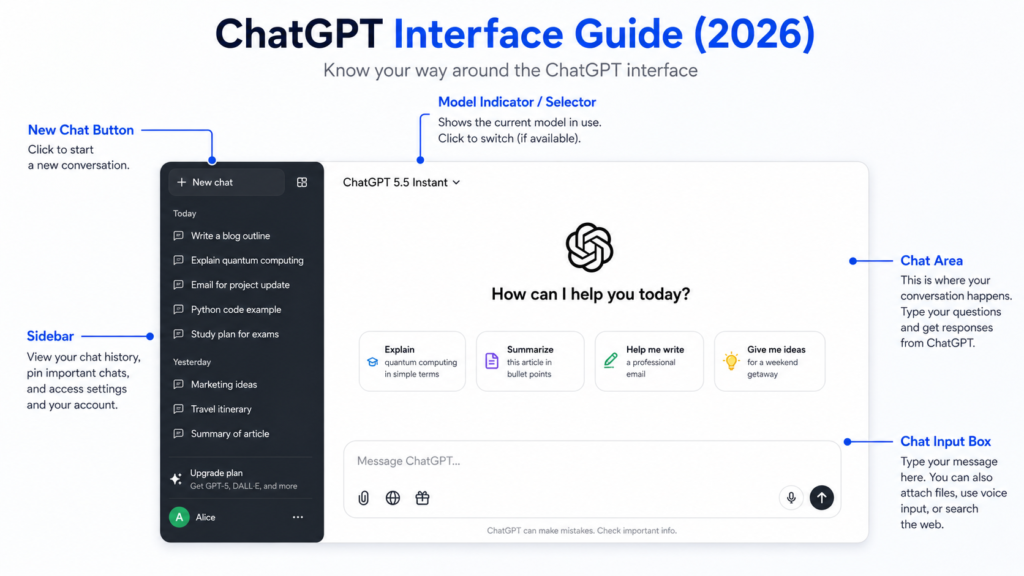
The ChatGPT interface has four elements worth knowing:
- Chat area: The main panel where you type prompts and read responses.
- Left sidebar: Your full conversation history, organized by date and searchable.
- New chat button (top left): Starts a fresh conversation. Once you start a new chat, ChatGPT has no memory of your previous one unless the Memory feature is enabled.
- Model indicator (top): Shows which AI model is currently active. Free users see GPT-5.5 Instant. If this switches to a “mini” variant mid-session, the message cap has been reached for that window.
Step 4: Write Your First Prompt
A prompt is simply your message to ChatGPT. You type it in the text field at the bottom and press Enter.
The most common beginner error is writing prompts that are too vague. Compare:
❌ “Write me an email.”
✅ “Write a professional email to my manager explaining that I will be 30 minutes late to tomorrow’s 10 AM meeting because of a doctor’s appointment. Keep it under 60 words. Polite tone.”
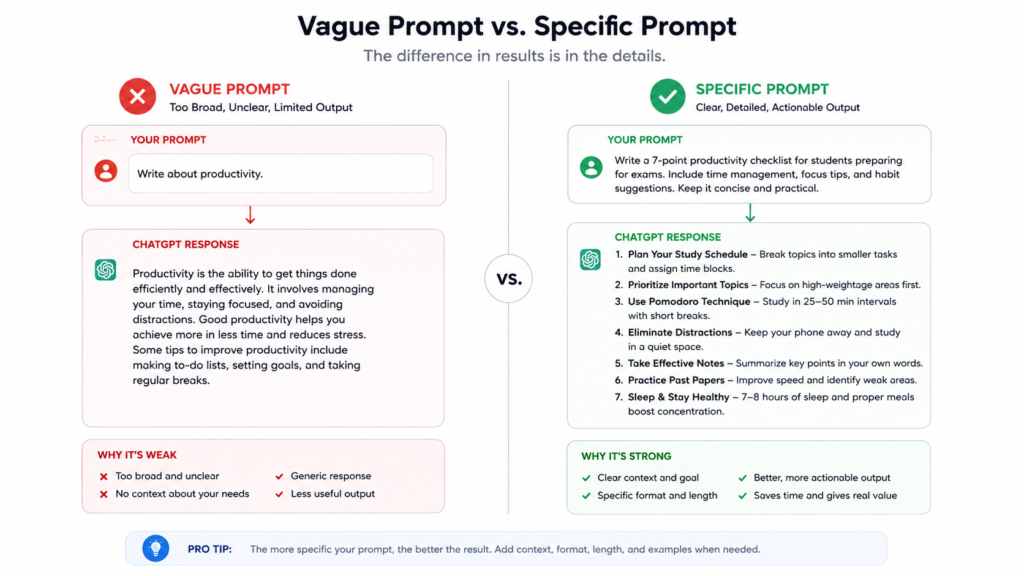
The second prompt gives context, format, and constraints in one message. ChatGPT’s response to the second prompt needs no follow-up. The first almost always does. Every follow-up message you send burns a message from your free daily limit which makes specific first prompts a practical efficiency move, not just a stylistic preference.
Step 5: Build One Consistent Daily Habit
The biggest productivity gain from learning how to use ChatGPT free does not come from experimenting with 20 different tasks. It comes from picking one thing you do every workday drafting emails, summarizing articles, preparing meeting notes and using ChatGPT for that task every single day for a week. The habit forms fast. After seven days, you will know exactly how much time it is saving and whether the free limit is actually a constraint for the way you work.
What You Can Do With ChatGPT on the Free Plan
Once you understand how to use ChatGPT free, these are the tasks that work well without paying anything:
Writing and editing:
- First drafts of emails, reports, cover letters, and proposals
- Rewrites in a different tone or at a different reading level
- Grammar and clarity improvements on text you paste in
- Social media captions, thread outlines, and post ideas
Research and learning:
- Plain-English explanations of complex topics including concepts from subjects like economics, biology, law, and engineering
- Summaries of long articles or documents you paste into the chat
- Q&A-style study sessions where you ask follow-up questions until you understand a topic
- Comparison breakdowns between two options or concepts
Coding:
- Debugging code paste the error and the code, and ChatGPT identifies the issue quickly
- Writing basic scripts in Python, JavaScript, HTML, or CSS
- Explaining what a specific block of code does line by line
Productivity:
- Converting rough notes into structured outlines or documents
- Creating project plans and to-do lists from a paragraph description
- Generating meeting agendas, templates, and checklists on demand
Translation:
- Quick, readable translations between major languages
- Informal language checks for writing done in a second language
The free plan handles all of these well for input under 3,000 to 4,000 words. For longer documents, paid plans with wider context windows do a more reliable job.
For a direct head-to-head comparison of ChatGPT against its two biggest competitors, the ChatGPT vs Claude vs Gemini breakdown for 2026 covers writing quality, coding, and free-tier differences side by side.
Best Prompts for Free-Tier ChatGPT Users
Knowing how to use ChatGPT free is the first step. Knowing how to write prompts that do not waste your limited message window is what makes the experience consistently useful rather than frustrating.
These prompt templates produce reliable results on the free plan:
For email drafting:
“Write a [professional/friendly/urgent] email to [recipient] about [subject]. The goal is [what you want to happen]. Tone: [tone]. Word limit: [number]. Include: [specific points you want covered].”
For summarizing:
“Summarize the following text in [X] bullet points. Focus on the main conclusions and any recommended actions. Ignore examples or background context. Here is the text: [paste text]”
For explaining a concept:
“Explain [concept] as if I have no background in [field]. Use a real-world analogy if possible. Keep it under [word count]. Avoid jargon if you must use a technical term, define it immediately.”
For editing:
“Edit the paragraph below. Fix grammar, shorten sentences over 20 words, remove filler phrases, and keep the meaning intact. Do not add new content. Here is the text: [paste]”
For brainstorming:
“Give me [X] ideas for [goal]. Context: I am [brief description]. Format as a numbered list with one sentence of explanation per idea. Prioritize ideas I can act on this week.”
The pattern across all of these: context upfront, format specified, constraints stated. Strong first prompts produce outputs you can use immediately or edit and use in under five minutes. That is how the free tier pays off for people who use it consistently.
ChatGPT Free vs Paid Plans: Is the Upgrade Worth It?

For anyone starting out and figuring out how to use ChatGPT free, the no-cost plan is clearly the right starting point. The core AI model GPT-5.5 Instant is the same on all consumer plans. What changes with paid tiers is how many messages you get and which advanced features you can access.
Pros of the free plan:
- No cost, no credit card required
- GPT-5.5 Instant access (same core model as paid)
- Sufficient for most beginner and moderate daily use
- Conversation history saved and searchable
- Basic voice mode included
- Works on both desktop and mobile
Cons of the free plan:
- Rolling message cap roughly 10–15 per 5-hour window
- No image generation
- No Deep Research feature
- Restricted file upload size
- Ads in the US
When to upgrade:
Upgrade when you consistently hit the message cap on tasks that directly affect your income or output quality. Not before. Most beginners who start using ChatGPT find the free plan sufficient for two to four weeks of regular use before any limits become a genuine blocker.
The Go plan at $8/month is worth considering if you hit the cap daily but do not need image generation or Deep Research. Plus at $20/month makes clear sense for professionals using ChatGPT for client deliverables, content production, or serious research tasks.
Common Mistakes Beginners Make When Using ChatGPT Free
Writing Prompts That Are Too Vague
The most common error when first learning how to use ChatGPT free is writing one-line prompts and spending four follow-up messages narrowing down the answer. Each follow-up burns one of your limited free messages. Writing specific, context-rich first prompts is not just about better output it is the practical way to make your free message window last longer.
Trusting Every Answer Without Verifying
ChatGPT makes confident mistakes. It can state incorrect statistics, invent studies, or misremember events that happened after its training cutoff. For anything you plan to publish, share professionally, or act on financially, verify from a primary source. This applies to both free and paid plans the model does not become factually reliable just because you are paying for it.
Starting a New Chat for Every Task
Each new chat resets ChatGPT’s context. If you are working on a project that builds across multiple exchanges a document draft, a series of code fixes, a research thread stay in the same conversation. Starting fresh means ChatGPT loses all the background it built up across the session.
Misunderstanding the Message Limit Reset
A common misconception about how to use ChatGPT free involves the reset timing. The 5-hour limit is a rolling window not a fixed midnight reset. If you send your first message at 9 AM and hit the cap by 10 AM, your window resets around 2 PM. Knowing this lets you schedule your usage in blocks rather than burning everything in one session and then waiting all day.
Using Fake ChatGPT Websites
Dozens of impersonator sites run search ads in 2026. Some charge monthly fees. Some collect your login credentials. The real ChatGPT is at chat.openai.com. If you ever see a site asking you to pay before using “ChatGPT,” you are on the wrong website.
Tips to Get More From Your Free ChatGPT Message Limit
1. Batch related tasks into one conversation. One email draft, one social post, and one document outline can happen inside the same conversation session. Grouping tasks saves messages by keeping context already loaded.
2. Front-load context in your first message. The more you explain upfront about how to use ChatGPT free for a specific task, the fewer follow-up messages you need. A complete first prompt that gives context, format, and constraints usually gets a usable result in one exchange.
3. Edit the output yourself instead of regenerating. If ChatGPT gives you something 80% right, copy it and fix the remaining 20% yourself. Clicking “Regenerate” burns another message. Your edits are usually faster than a regeneration anyway.
4. Enable Memory in Settings. Go to Settings > Personalization > Memory. Once on, ChatGPT retains facts across sessions your role, preferred writing style, recurring context. This removes the need to re-explain yourself at the start of every new conversation.
5. Use the right AI tool for each task. ChatGPT is not the best free AI for everything. For creating images without watermarks, dedicated free AI image generators in 2026 handle that better than the text-focused ChatGPT free tier. For research with citations, Perplexity AI is more reliable. Save your ChatGPT messages for writing, summarizing, and brainstorming the areas where it performs best.
6. Plan around the 5-hour reset window. Note the time when you start your first session. If you hit the message cap, schedule your next batch of tasks for 5 hours after that first message not at midnight.
People Also Ask
Q: How do I use ChatGPT free without a subscription?
Here is exactly how to use ChatGPT free with no subscription at all: go to chat.openai.com, click Sign Up, register with an email or Google account, and click “Maybe later” when the paid plan screen appears after signup. The free plan activates immediately. No credit card is required at any step. You will have access to GPT-5.5 Instant with a rolling 5-hour message limit.
Q: What is the message limit on ChatGPT free in 2026?
Based on consistent community testing as of June 2026, free-tier users get roughly 10 to 15 GPT-5.5 Instant messages per 5-hour rolling window before the system throttles the account or switches to a lighter fallback model. OpenAI does not publish an exact number the cap can vary with server load.
Q: Is ChatGPT free in India?
Yes. ChatGPT is free to access in India with no regional restrictions on the standard free plan. India is ChatGPT’s second-largest user base globally accounting for 9.79% of total web traffic as of April 2026, according to Similarweb data. The signup process is identical to anywhere else in the world: chat.openai.com, free account, no payment required.
Q: Can I use ChatGPT without creating an account?
You can send a few messages at chat.openai.com without logging in through a temporary session. However, the unregistered session does not save your chat history and may have stricter usage limits. Creating a free account takes under 2 minutes and gives you saved history, higher daily usage, and access to the Memory feature.
Q: What can ChatGPT do for free that is genuinely useful?
The main limitations that apply when you want to use ChatGPT free are the message cap, no image generation, no Deep Research, and restricted file uploads. Within those limits, the free plan handles everyday writing, summarizing, explaining, basic coding, translation, and brainstorming tasks well which covers most of what beginners actually need when they first start out.
Q: Should I upgrade from the free plan or keep using ChatGPT free?
How to use ChatGPT free without needing to upgrade: use it consistently for two to three weeks and track whether you regularly hit the message cap on tasks that directly affect your work. If you never hit the cap, stay on the free plan. If you hit it daily, the $8/month Go plan is the smallest logical step up.
Frequently Asked Questions
Q1: What is the difference between ChatGPT free and ChatGPT Plus in 2026?
The core AI model is the same on both plans GPT-5.5 Instant. The differences are message limits, features, and ads. Free gives roughly 10–15 messages per 5-hour window with no image generation and no Deep Research. Plus at $20/month gives 160 messages per 3-hour window, adds image generation (via Sora), Deep Research, advanced reasoning mode, and no ads. For most beginners, the free plan handles their needs for several weeks before any limits become a real issue.
Q2: Can you use ChatGPT free on a phone?
Yes. You can use ChatGPT free on mobile through the official ChatGPT app available at no cost on both Android and iOS. The mobile app mirrors the desktop experience and includes basic voice mode, which lets you speak your prompt instead of typing. The same free-tier message limits apply. The app works reliably on mid-range Android phones without requiring high-end hardware.
Q3: Does ChatGPT free save your conversation history?
Yes. All conversations in a logged-in free account are saved in your chat history, visible in the left sidebar. They are searchable and can be renamed, pinned, or deleted. If you use a temporary session without logging in, nothing is saved.
Q4: Can ChatGPT free access the internet in 2026?
Free-tier users have limited access to ChatGPT’s web search capability, but it is not consistently available across all regions or usage situations. For research that requires verified, sourced answers, Perplexity AI is a more reliable free alternative it shows citations for every answer by default.
Q5: How do I know if ChatGPT has switched to the mini model mid-session?
Check the model indicator at the top of the chat window. If it shows a name containing “mini” instead of GPT-5.5 Instant, the system has switched after hitting the message cap. Responses will often feel shorter or less detailed. The full model returns automatically once the 5-hour window resets.
Q6: Is it safe to use ChatGPT free for business tasks?
For general business writing drafting emails, building outlines, summarizing internal notes the free tier works well. Avoid pasting genuinely sensitive data (confidential client contracts, financial records, personal health information) into the free tier. Free-plan inputs may be used for model training per OpenAI’s current terms. If data privacy is a serious concern for your use case, review OpenAI’s privacy policy before using the free plan for sensitive professional work.
Q7: What is the best way to use ChatGPT free for Indian students?
For Indian students, the highest-value free-tier tasks are: summarizing long textbook chapters or study materials pasted into the chat, getting plain-English explanations of difficult concepts, drafting essay outlines and assignment frameworks, practicing for interviews through Q&A sessions, and translating or simplifying text between English and regional languages. English prompts consistently produce more reliable results than Hinglish or mixed-language inputs, though ChatGPT handles bilingual explanations reasonably well.
Key Takeaways
- How to use ChatGPT free today: Go to chat.openai.com, sign up with any email or Google account, and skip the paid plan offer. The free plan starts immediately with no payment details required.
- GPT-5.5 Instant is the default model on the free plan the same core AI as paid plans, with a rolling 5-hour message cap of roughly 10–15 messages.
- According to Airefs (May 2026), 81% of ChatGPT’s active users are on the free plan. Most people who use ChatGPT daily are not paying.
- Specific prompts get better results and use fewer messages. Give context, specify format, and state constraints in your first message.
- Learning how to use ChatGPT free well means treating it as a drafting and thinking tool always review and improve the output before using it for anything important.
- The 5-hour message limit resets as a rolling window, not at midnight. Plan usage across the day rather than front-loading it into one session.
- Upgrade to a paid plan only when you consistently hit the message cap on tasks that directly affect your work output. Not before.
Final Verdict
ChatGPT’s free plan in 2026 is a genuine tool, not a bait-and-switch demo. Knowing how to use ChatGPT free correctly with the right website, clear prompt structure, and a realistic understanding of the message limits is what separates a useful daily experience from a frustrating one.
The 81% of users staying on the free plan are not doing it because they are unaware of Plus. They are there because the free tier covers what they actually need. Most beginners who start today will find the same thing: two to three weeks in, the free plan either becomes a natural part of their workflow, or the specific features they want become obvious enough to justify paying.
Start with the free plan. Pick one task. Write a specific prompt. Review the output. Improve it. Repeat that for a week. Everything else will become clear on its own.
The tool is free. The setup takes under 5 minutes. There is no sensible reason to wait.
About the Author
Sahil Ansari is the Founder of Playsip India and a digital entrepreneur with experience in AI tools, e-commerce, content creation, and online business. He researches emerging technologies, productivity systems, and digital growth strategies to help entrepreneurs, freelancers, and creators work smarter.
For this article, Sahil reviewed data from OpenAI’s official Help Center, Backlinko’s April 2026 ChatGPT statistics research, Airefs’ May 2026 user-tier data, Reuters’ June 2026 user milestone reporting, and Similarweb April 2026 traffic data to ensure accuracy.
Ready to Start Using ChatGPT for Free?
Go to chat.openai.com. Create your free account in under 2 minutes. Use it for your next writing or research task instead of doing it manually.
For more on building an AI workflow without spending anything, explore the full guide to 100 free AI tools in 2026 covering everything from writing and design to video and coding.
This article is for education and is not financial, tax or legal advice. Read the full disclaimer. How we create content.
Keep learning: AI Tools
More sourced guides on this topic, written and checked by our team.
Keep reading

7 Best Free AI Image Generator No Watermark 2026 (Tested & Ranked)
Quick Answer Box The best free AI image generator no watermark 2026 options are Microsoft Designer (15 daily fast boosts, DALL-E 3 quality), Leonardo.ai

ChatGPT vs Claude vs Gemini (2026): Which AI Actually Wins?
In this ChatGPT vs Claude vs Gemini comparison, a blind test with 134 voters and 8 prompts shows clear differences between all three models

100 Best Free AI Tools in 2026 That Can Save You Hours Every Day
The best free AI tools in 2026 include ChatGPT, Claude, Google Gemini, Microsoft Copilot, Perplexity, Grammarly, NotebookLM, Suno AI, GitHub Copilot, and Bing Image